

Security
How to Back Up and Restore Your Recovery Phrase
Back up a 24-word recovery phrase and passphrase, restore a wallet in Lensly, and move it between Lensly and a Ledger hardware wallet.
Your recovery phrase is 24 words that restore your wallet. Write the phrase down on paper, keep the paper offline, and never store it in a photo, a notes app or a cloud drive. This page covers backup, restore, passphrases, and moving a wallet to or from a Ledger.
Back Up the Recovery Phrase
- Open Lensly and open the wallet. Tap the options icon, or press and hold the wallet name, then tap Show Secret Phrase. Read the warning and tap Reveal.
- Enter your Application Password.
- Write all 24 words on paper, in order. Lensly shows the words one at a time, and you move through them with Next and Previous. It shows the secret for 60 seconds and then hides it.
- If you set a passphrase, tap Passphrase and write it on a separate piece of paper.
- Store both papers apart from each other.
Lensly marks a wallet as backed up only after it has shown you every part of the secret, including the passphrase if the wallet has one.
Restore a Wallet in Lensly
- On the home screen of a new vault, tap Restore. In a vault that already holds wallets, tap Wallets at the bottom of the home screen, tap Add Wallet, then tap Restore.
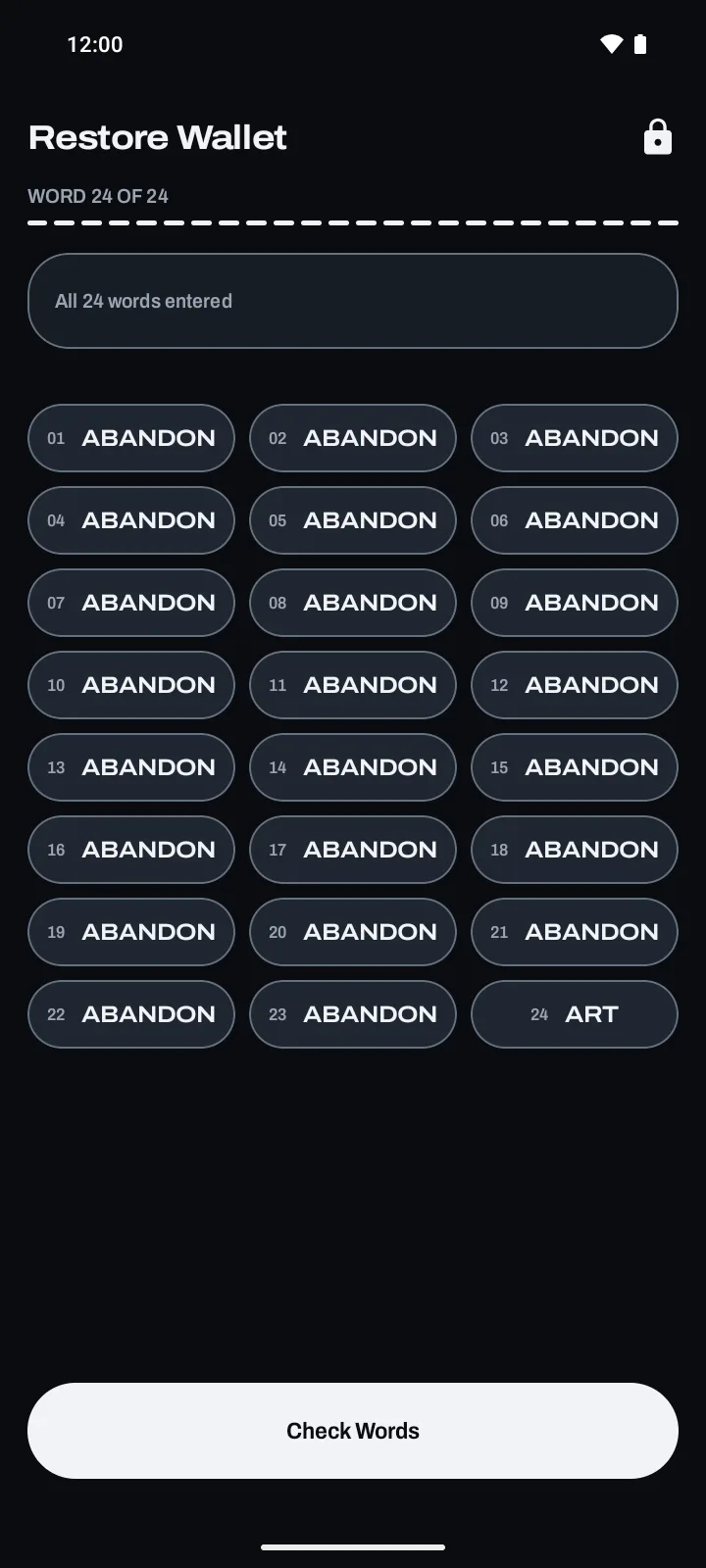
- On the Restore Wallet screen, type the 24 words in order. Tap a suggestion, or press space, after each word.
- If the words do not form a valid phrase, Lensly shows Invalid Checksum. Check each word, in order.
- If the wallet has a passphrase, enter the same passphrase.
- Add accounts until each chain app has the same number of accounts that the wallet had before. A restored wallet starts with one account in each chain app, and you add more from each chain app’s own screen in the wallet.
Lensly accepts only 24-word phrases.
Passphrases
A passphrase is an optional extra secret. It changes which wallet the 24 words open.
- A lost passphrase cannot be recovered. Without it, the 24 words restore a different, empty wallet.
- The passphrase is case-sensitive. Type it the same way every time.
- A Ledger accepts up to 100 characters, typed on its own keyboard. Lensly warns you if your passphrase is longer than 100 characters, or if it contains characters a Ledger cannot type. Accounts that use such a passphrase cannot be restored on a Ledger.
Move a Wallet to a Ledger
- On the Ledger, choose Restore from recovery phrase, and enter the 24 words.
- If you use a passphrase, set it on the Ledger under Settings > Security > Passphrase. Use “attach to a PIN”, or a temporary passphrase for one session.
- In Ledger Live, add accounts for each chain you use. Ledger Live finds the same addresses that Lensly shows.
Move a Wallet from a Ledger to Lensly
- In Lensly, restore the wallet with the 24 words, as in the steps above. A Ledger phrase of 12 or 15 words cannot be imported.
- If you used a passphrase on the Ledger, enter the same passphrase.
- Add accounts until each chain app has the same number of accounts that you had on the Ledger.
Derivation Paths
Each chain page lists its derivation path. See Bitcoin Support in AirVault, Ethereum and EVM Networks in AirVault, Solana Support in AirVault, and Algorand Support in AirVault.
Next Steps
Read Frequently Asked Questions About AirVault for short answers about recovery. For the risks that a backup does not remove, read How AirVault Protects Your Keys and What It Cannot Protect.